




Vaccination record management is one of the quiet operational workflows that can make or break a pet grooming franchise’s day. If a required record is missing, expired, buried in an inbox, or tied to the wrong pet profile, the issue often surfaces at the worst possible moment: when the client is checking in, the dog is already at the facility, and the front desk is trying to keep the schedule moving.
For a single salon, that creates friction. For a franchise network, it creates inconsistency. One location may collect records during booking, another may ask at check-in, another may store files manually, and another may not realize a record is expired until the appointment is already underway.
That is why vaccination record management should be treated as a connected workflow, not just a document storage task. The right system helps pet grooming franchises collect records before the visit, attach them to the correct pet profile, track expiration dates, alert staff to missing or expired information, remind clients before records lapse, and keep visibility consistent across locations.
This article is not veterinary advice. Vaccination requirements can vary by service type, location, facility policy, local rules, and veterinarian guidance. The operational goal is to help franchise teams manage the records their business requires in a way that is consistent, visible, and easier for both staff and clients.
Why vaccination records matter in pet grooming and boarding operations
Pet grooming and boarding businesses often serve pets in environments where dogs may be near other dogs, staff, equipment, shared spaces, or care routines. Vaccination record visibility helps staff understand whether a pet is ready for a scheduled service based on the brand’s policies and the specific service being booked.
External guidance supports the importance of up-to-date vaccination workflows in pet care settings. AAHA categorizes canine vaccines as core and noncore, and notes that some recommendations depend on the dog’s lifestyle and risk factors (AAHA). AVMA says dogs are at risk for canine influenza in settings that bring dogs close together, including boarding, dog daycare, dog parks, dog shows, agility events, and travel settings (AVMA). CDC also says pet owners can lower rabies risk by keeping pets up to date on rabies vaccines, and that rabies vaccination status can matter after a bite because it helps determine follow-up actions (CDC).
For pet grooming franchises, the operational takeaway is straightforward: staff need fast access to current vaccination information when it affects service readiness. The system should show what is on file, what is missing, what is expiring soon, and what needs follow-up before the pet arrives.
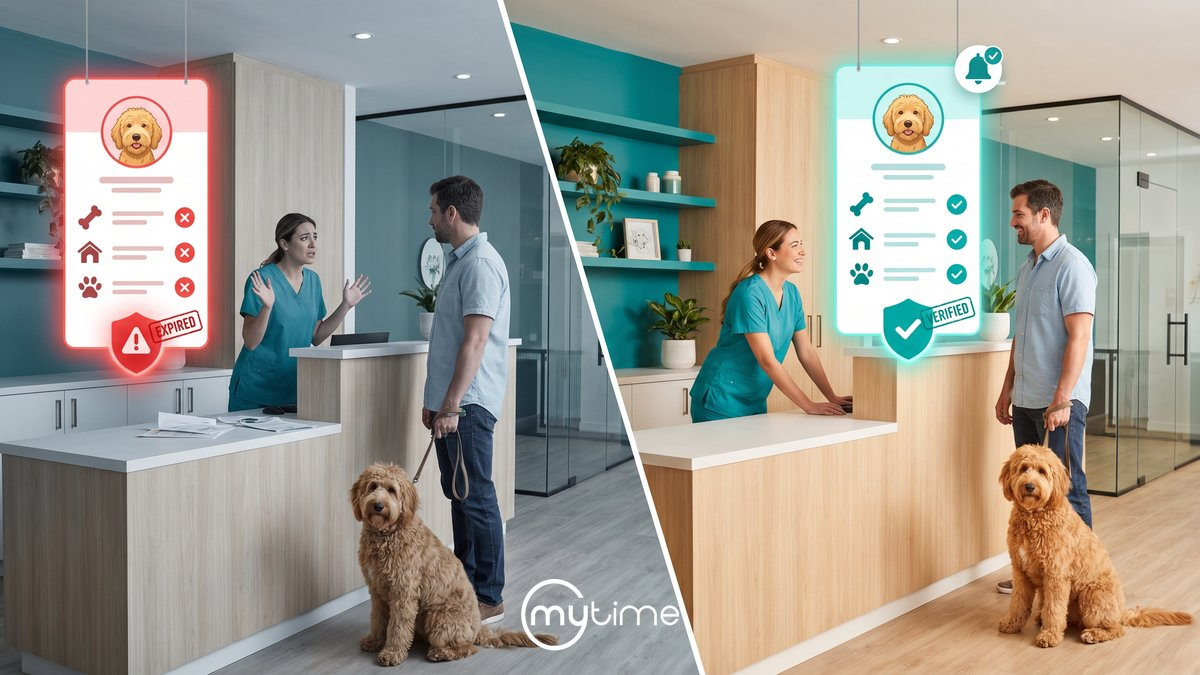
Missing or expired records create last-minute friction
Vaccination record problems are most disruptive when they appear late. If staff cannot see a missing or expired record until check-in, they may have to pause the intake process, call the client, search through notes, look for an attachment, or delay the appointment. MyTime’s pet care operations article describes delayed access to vaccination status as a visibility issue that can lead to last-minute calls or denied services when staff and clients do not know whether a scheduled pet is up to date with required vaccinations (MyTime operational challenges).
That kind of friction affects more than one appointment. It can slow the front desk, disrupt groomer schedules, create an inconsistent client experience, and make staff feel like they are managing exceptions all day. MyTime’s pet grooming franchise buyer guide also notes that staff should not have to search notes or a separate system to know whether a vaccination record is missing or expired, and that the requirement should be visible during booking or check-in (MyTime buyer guide).
Strong vaccination record management moves those issues upstream. Instead of discovering problems in the lobby, the system helps teams identify missing or expiring records during booking, intake, reminder, reporting, and pre-visit preparation workflows.
What vaccination record management software should do
Vaccination record management software should help pet grooming franchises collect, store, track, update, and surface pet vaccination records across the full client journey. At a minimum, that means connecting the following pieces:
- Pet profiles linked to client accounts
- Vaccination fields by pet
- Expiration dates and upcoming or expired status
- File attachments for vaccination records
- Digital intake forms
- Service-specific intake questions
- Automated reminders
- Staff visibility during booking and check-in
- Cross-location profile access
- Branded client self-service for profile updates
- Role-based permissions
- Audit visibility for profile and record changes
- Reporting for upcoming expirations
The key is not just having each feature somewhere in the system. The key is making the workflow connected. If a client uploads a vaccination record through an intake form, that information should flow into the pet profile. If a record is expiring, reminders should help the client update it. If a staff member opens the appointment, the pet’s vaccination status should be visible where work is already happening.
Intake forms should collect records before the visit
Digital intake is one of the best places to reduce vaccination record surprises. Instead of asking staff to chase records after an appointment is booked, the booking and intake flow can prompt clients for the information the business needs before arrival.
MyTime’s automated intake article says intake is part of the booking flow, with service-specific forms sent to clients after booking, and that forms can gather preferences, signatures, or vaccination records while allowing clients to upload and store documents digitally before the appointment (MyTime automated intake). MyTime’s operational challenges article also says digital intake forms can capture critical pet information before appointments, including feeding instructions and vaccination history, which helps reduce last-minute surprises and improve the booking experience (MyTime operational challenges).
For franchises, service-specific intake matters because not every service needs the same questions. A grooming visit, daycare session, boarding stay, class, or membership-related service may require different information. MyTime’s Help Center says pet intake forms can include custom client and pet fields, can be associated with specific services, classes, or memberships for online visibility, and can store submitted information on the pet profile (MyTime Help: creating pet intake forms).
That last point is important. Intake forms are not just forms. In a connected system, they update the operational record staff rely on.
Pet profiles should show vaccination status, expirations, and attachments
A pet profile should be the single place staff can look to understand the pet’s service readiness and care context. For vaccination record management, that means the profile should show vaccination fields, expiration dates, attachments, and visible status indicators for upcoming or expired records.
MyTime’s pet salon page says pet profiles can carry history, preferences, memberships, behavior icons, notes, vaccination tracking with expirations, automatic renewal reminders, medical history, dietary needs, and records across locations (MyTime pet salon). MyTime’s buyer guide says expiration reminders can be added to custom pet fields, used for vaccination expiration, displayed as upcoming or expired badges, included in intake forms, and paired with file attachments such as vaccination records (MyTime buyer guide).
MyTime’s Help Center provides more detail on how this works in the product. Upcoming expiration and expired reminders are custom fields with time-based alerts, and MyTime says the feature is especially useful for pet businesses that need to maintain up-to-date vaccination records (MyTime Help: upcoming and expired reminders). The same Help Center article says these reminders can display an orange “Expires Soon” badge or a red “Expired” badge on a client, pet, or family member profile and in the appointment modal, giving staff visibility before or during appointment workflows (MyTime Help: upcoming and expired reminders).
The benefit for staff is simple: they should not need to hunt through emails, paper files, notes, or separate systems. If the pet has a missing, expiring, or expired vaccination record, the system should make that clear in the profile and appointment context.
Automated reminders help records stay current
Vaccination record management should not depend on staff remembering to follow up manually. Automated reminders can help clients update records before they expire, which reduces last-minute issues and supports a smoother check-in process.
MyTime’s pet salon page says pet care brands can use automated vaccination and health check-up reminders to help keep pets safe (MyTime pet salon). MyTime’s automated intake article also says smart tags can flag missing or expired information, and that submitted information ties to the client’s global profile so staff have complete context at any location (MyTime automated intake).
The Help Center adds more product-specific detail. MyTime says expiration reminder notifications are useful for pet businesses that require updated vaccination records and can be configured as automated notifications to remind clients of upcoming expirations (MyTime Help: configure expiration reminder notifications). MyTime also says reminder templates can have multiple cadences, include an expiration date variable, and use fallback delivery across email, SMS, and push notification when the primary method is unavailable (MyTime Help: configure expiration reminder notifications).
The workflow can go beyond a simple reminder. MyTime says expiration reminder messages can include a link that lets recipients attach a document related to the expired field, such as vaccination records, and that an email is sent to the location when the document has been updated so the expiration date can be reset (MyTime Help: configure expiration reminder notifications).
For franchise teams, that creates a more proactive operating model. Instead of relying on a front-desk call at check-in, the system can remind the client, collect the record, alert the location, and help staff update the profile before the appointment.
Multi-location franchises need records that travel with the pet
Vaccination record management becomes more complex when a brand operates across multiple locations. Clients may visit a different branch than usual. A pet may have service history, preferences, behavior notes, vaccination records, or feeding instructions recorded at another location. Corporate teams may want consistent protocols, while local teams still need the flexibility to manage their location’s workflow.
MyTime’s pet salon page says client and pet records are accessible across locations, and that profiles can store preferences, medical history, behavior icons, dietary needs, service history, behavior data, and vaccination tracking (MyTime pet salon). MyTime’s scalable pet care article says MyTime centralizes client and pet information, including vaccination records, service history, feeding instructions, preferred staff, multi-pet households, linked family accounts, unified billing, profile tags, staff notes, and real-time data sync across locations (MyTime scalable pet care).
That kind of cross-location visibility helps prevent the same client from having to re-explain care details every time they visit a new branch. It also helps staff deliver a more consistent experience because the record follows the client and pet, rather than staying locked inside one location’s notes.
Franchise controls matter too. MyTime’s scalable pet care article says enterprise account hierarchy gives pet care franchises centralized oversight with local flexibility, allowing corporate teams to control services, pricing, memberships, and booking policies while locations tailor settings based on demand (MyTime scalable pet care). The same article says new-site onboarding can use pre-configured templates for vaccination protocols, staff roles, and intake forms to reduce administrative overhead and standardize operations across franchise locations (MyTime scalable pet care).
For a growing pet grooming franchise, that balance is essential. Corporate can define the operating framework, and locations can work inside a consistent system instead of building one-off manual processes.
Branded self-service can help clients keep records updated
Clients also need an easy way to keep pet information current. If the only way to update a vaccination record is to call the location, email an attachment, or bring paper to the appointment, staff will continue to absorb unnecessary follow-up work.
MyTime’s pet salon page says the Branded Guest App lets clients manage accounts, view bookings, update pet profiles, add new pets, update existing details, receive real-time notifications, and book at any branch (MyTime pet salon). MyTime’s Help Center also says clients can manage pet profiles online through the booking widget account area by adding new pet profiles, editing existing pet information, and saving changes that are reflected when viewing the client profile (MyTime Help: manage pet profile online).
Self-service does not replace staff review. It reduces friction by giving clients a convenient path to provide current information, while keeping updates connected to the profile staff already use.
Permissions and audit visibility support accountability
Vaccination records, pet profiles, intake forms, and client data need the right access controls. Not every employee should be able to configure fields, change setup rules, or edit every part of the record. At the same time, staff who need the information to prepare for an appointment should be able to see the right details at the right moment.
MyTime’s scalable pet care article says automated intake forms and vaccine reminders streamline pre-visit preparation, and role-based permissions help ensure data access stays secure and appropriately restricted (MyTime scalable pet care). MyTime’s Help Center says configuring upcoming expiration and expired reminders is governed by the “Manage Client Setup” access control setting, and editing pet information is governed by the “Accessing Client Records” access control setting (MyTime Help: upcoming and expired reminders, MyTime Help: editing pet profiles).
Audit visibility also becomes more important as brands grow. MyTime’s audit trails article says multi-location service brands need clear records of who did what and when, and that audit visibility becomes a core operational requirement as organizations grow (MyTime audit trails). The article also says platform-wide audit visibility can track changes to client profiles, staff records, business configuration settings, gift card balances, loyalty point activity, referral credits, and more with attribution, timestamps, and a clear record of what changed (MyTime audit trails).
For vaccination record workflows, the point is accountability. Teams need a clear process for who can configure fields, who can update profile data, and how the business keeps visibility into important changes.
Reports help teams prioritize upcoming expirations
Even with intake forms and reminders, franchise teams still need a way to see which records require attention. Reporting turns vaccination record management from a reactive workflow into an operational planning tool.
MyTime’s Help Center says the Upcoming Expirations report gives pet-based accounts a centralized view of pets and vaccination due dates, sorted so expired dates and earliest upcoming expirations are easiest to prioritize (MyTime Help: upcoming expirations report). MyTime says the report displays all pets with at least one completed expiration reminder field, excludes deceased pets and pets with no vaccination data on file, highlights expired dates in red, and displays vaccination columns based on configured expiration reminder custom fields (MyTime Help: upcoming expirations report).
The report can also help teams act before upcoming visits. MyTime says the Upcoming Expirations report can filter by location and by pets with an upcoming appointment in the next 30 days, which lets teams prioritize outreach for clients who are visiting soon (MyTime Help: upcoming expirations report). MyTime also says the report can be downloaded as CSV, PDF, or print output and includes columns such as pet name, client, and configured vaccination expiration fields such as Rabies Expiration, Distemper Expiration, and Bordetella Expiration (MyTime Help: upcoming expirations report).
For operators, that kind of report supports smarter follow-up. A location can focus on pets with upcoming appointments. A regional leader can understand where records may need attention. Corporate can reinforce the workflow without waiting for issues to appear at check-in.
What to look for in vaccination record management software
When evaluating software for vaccination record management, pet grooming franchises should look for a connected workflow, not a standalone file upload field. A strong system should help teams collect records, make them visible, monitor expirations, remind clients, and standardize processes across locations.
Use this checklist as a practical evaluation guide:
- Pet profiles linked to client accounts
- Vaccination fields at the pet level
- Expiration dates for required records
- Upcoming or expired status indicators
- File attachments for vaccination records
- Digital intake forms connected to booking
- Service-specific intake questions
- Client document uploads before the appointment
- Automated reminders before records expire
- Links that let clients upload updated documents
- Staff visibility during booking, check-in, and appointment workflows
- Cross-location pet and client profile access
- Branded client self-service for pet profile updates
- Role-based permissions for setup and profile access
- Audit visibility for profile and record changes
- Standardized templates for vaccination protocols, roles, and intake forms
- Reporting for upcoming and expired records
- Location filters and appointment-based follow-up filters
- Export options for operational review
The strongest systems make these pieces work together. If vaccination records are collected in one place, stored in another, monitored somewhere else, and reviewed manually, the franchise still has a disconnected workflow.
How MyTime helps pet grooming franchises manage vaccination records
MyTime helps pet grooming franchises manage vaccination record workflows by connecting pet profiles, intake forms, reminders, document uploads, profile visibility, self-service updates, reporting, and multi-location controls in one operating system for pet care brands.
MyTime’s pet salon page says profiles can carry history, preferences, memberships, behavior icons, notes, vaccination tracking with expirations, automatic renewal reminders, medical history, dietary needs, and records across locations (MyTime pet salon). MyTime’s Help Center says upcoming expiration and expired reminder fields can be added to pet fields, included as questions in intake forms, and used to collect and display attachments such as vaccination records with an expiration date (MyTime Help: upcoming and expired reminders).
MyTime also supports the client side of the workflow. Clients can add expiration dates and attach vaccination records through the booking widget during checkout, and the attached file appears below the expiration date once added (MyTime Help: upcoming and expired reminders). Clients can also manage pet profiles online through the booking widget account area, including adding new pet profiles and editing existing pet information (MyTime Help: manage pet profile online).
For proactive follow-up, MyTime supports automated expiration reminder notifications with configurable cadences, expiration date variables, and fallback delivery across email, SMS, and push notification (MyTime Help: configure expiration reminder notifications). For operational oversight, MyTime’s Upcoming Expirations report gives pet-based accounts a centralized view of pets and vaccination due dates, with filters by location and upcoming appointments in the next 30 days (MyTime Help: upcoming expirations report).
For franchisors, the bigger value is orchestration. MyTime helps turn vaccination record management into a connected process across booking, intake, pet profiles, reminders, staff visibility, client self-service, reporting, permissions, and cross-location operations.
If your pet grooming franchise is ready to make vaccination records easier to collect, track, update, and access across locations, book a MyTime demo.
FAQ
What is vaccination record management for pet grooming franchises?
Vaccination record management is the workflow pet grooming franchises use to collect, store, track, update, and surface pet vaccination records across booking, intake forms, pet profiles, reminders, check-in, and multi-location operations. The goal is to make required records easier for clients to provide and easier for staff to see before service.
Why do pet grooming franchises need vaccination record management?
Pet grooming franchises need vaccination record management because missing or expired records can create last-minute calls, delayed check-ins, denied services, and inconsistent location-level processes. MyTime’s operational challenges article notes that delayed access to vaccination status can lead to last-minute calls or denied services when staff and clients do not know whether a scheduled pet is up to date with required vaccinations (MyTime operational challenges).
What features should vaccination record management software include?
Vaccination record management software should include pet profiles, vaccination fields, expiration dates, file attachments, digital intake forms, automated reminders, status indicators for upcoming or expired records, cross-location access, client self-service, role-based permissions, audit visibility, and reporting for upcoming expirations. MyTime’s Help Center documents product capabilities for expiration reminder fields, document attachments, client upload links, pet profile updates, and upcoming expiration reporting (MyTime Help: upcoming and expired reminders, MyTime Help: configure expiration reminder notifications, MyTime Help: upcoming expirations report).
Can clients upload vaccination records before an appointment?
Yes. MyTime says clients can add expiration dates and attach vaccination records through the booking widget during checkout, and MyTime’s automated intake article says clients can upload and store documents digitally before the appointment through intake workflows (MyTime Help: upcoming and expired reminders, MyTime automated intake).
How does MyTime support vaccination record management?
MyTime supports vaccination record management with pet profiles, vaccination tracking, expiration reminder fields, document uploads, digital intake forms, automated reminder notifications, client self-service profile updates, cross-location profile access, role-based permissions, audit visibility, and upcoming expiration reporting. MyTime’s pet salon page, buyer guide, and Help Center document these capabilities across pet profiles, intake, reminders, online profile management, and reporting (MyTime pet salon, MyTime buyer guide, MyTime Help: upcoming expirations report).