

Med spas, massage studios, skin care brands, IV hydration lounges, and brow and lash studios all rely on the same thing to deliver a consistent experience: knowing what happened at the client’s last visit. Too often, those details live on paper face charts, photocopied body maps, or a few lines of free text that the next provider has to interpret. This article covers how service businesses use SOAP notes to capture appointment details in a structured way, how Visual Charting in MyTime brings face and body charts into the appointment record, and how franchise brands keep service documentation consistent across every location.
What Are SOAP Notes for a Med Spa or Massage Business?
For service businesses, SOAP notes are structured service notes that staff complete during or after an appointment. Instead of writing free-form notes, staff fill in a form the business designs, so every provider records the same details in the same way.
In MyTime, SOAP notes are built as staff intake forms that open directly from the appointment. Businesses choose which fields appear on each form, which services the form applies to, and which staff roles can see it. A form for a facial can capture different details than a form for a deep tissue massage, and each provider only sees the forms relevant to their work. Notes are stored with the appointment and aren’t visible to the client.
Why Do Paper Face Charts and Body Maps Cause Problems?
Paper charts work well in the moment. A provider can circle an area on a face map in seconds. The problems show up afterward. Paper charts get misfiled, scanned at odd angles, or left in a binder at one location while the client books at another. Handwriting varies from provider to provider, and a chart that made sense to the person who drew on it can be hard for the next person to read.
Text-only digital notes solve the filing problem but lose the visual one. Writing “focus on left upper back, avoid right shoulder” takes longer than circling two areas, and it’s easier to misread. Service businesses need both: the speed and clarity of a marked-up chart, and the organization of a digital record that stays with the client.
Can You Chart on a Face Map or Body Map Digitally?
Yes. Visual Charting in MyTime lets businesses turn the face maps, body maps, and intake sheets they already use into fillable, markable charts inside the appointment.
Start With the Charts Your Team Already Uses
Businesses upload their own chart image as a PNG or JPEG file. That could be a face map for facials, a front and back body outline for massage, a brow mapping diagram, or a scan of a printed intake form. If a business prefers, it can start from a blank canvas instead. Each chart has its own image and fields, so a business can set up a different chart for each type of service.
Place Fillable Fields Exactly Where the Answers Belong
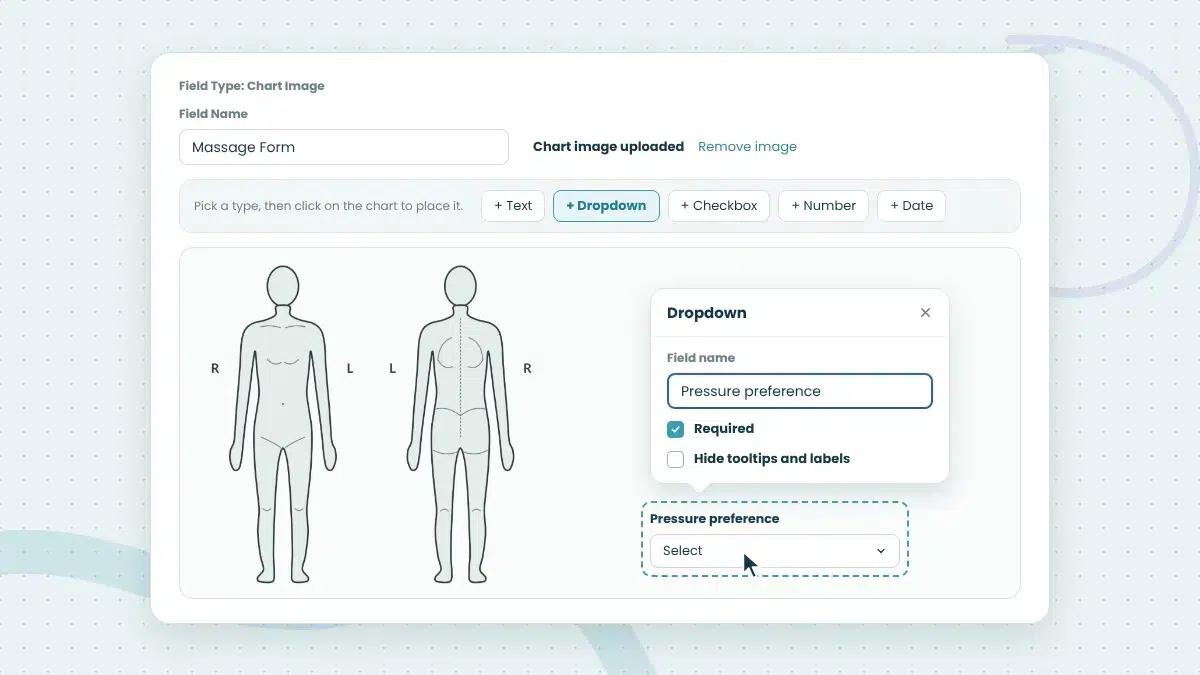
Once the image is in place, the business adds fields directly on top of it: text boxes, dropdowns, numbers, dates, and checkboxes. Each field can be positioned and resized to sit where the answer belongs on the image, such as beside a printed question or next to an area of the body outline. Fields can include labels, placeholder text, and tooltips for guidance, and any field can be marked as required before the chart is saved.
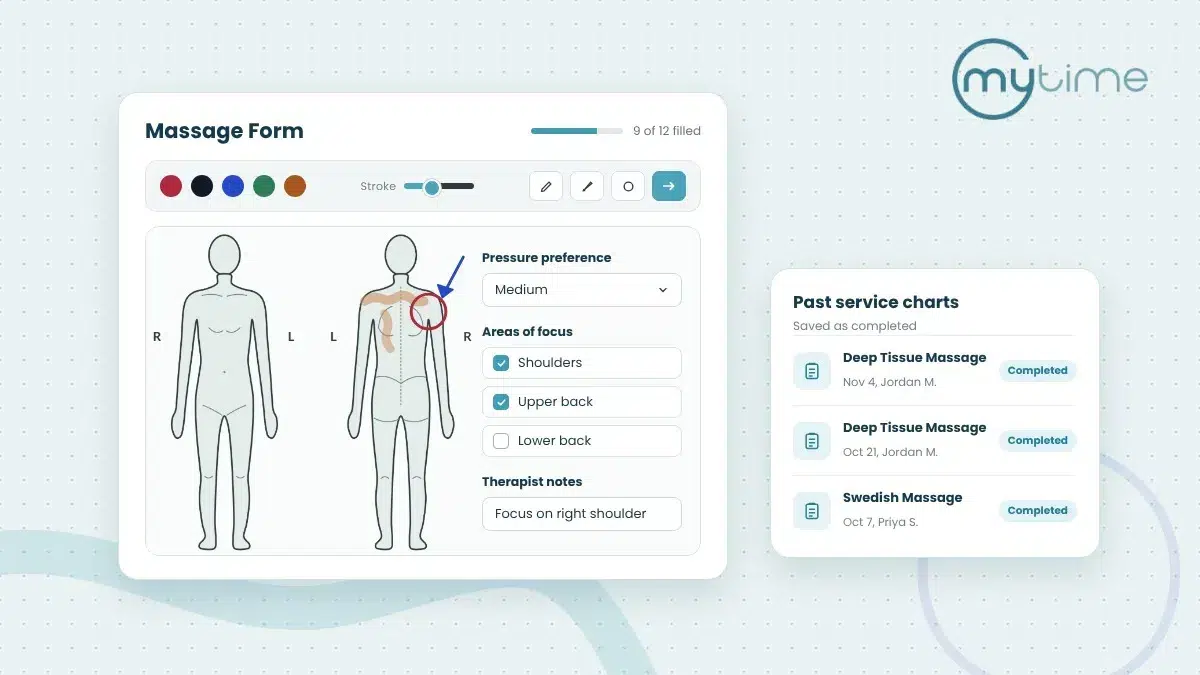
For example, a massage studio could upload a front and back body outline, then add a dropdown for pressure preference, checkboxes for areas of focus, and a text box for therapist notes.
Mark Treatment Areas With Built-In Drawing Tools
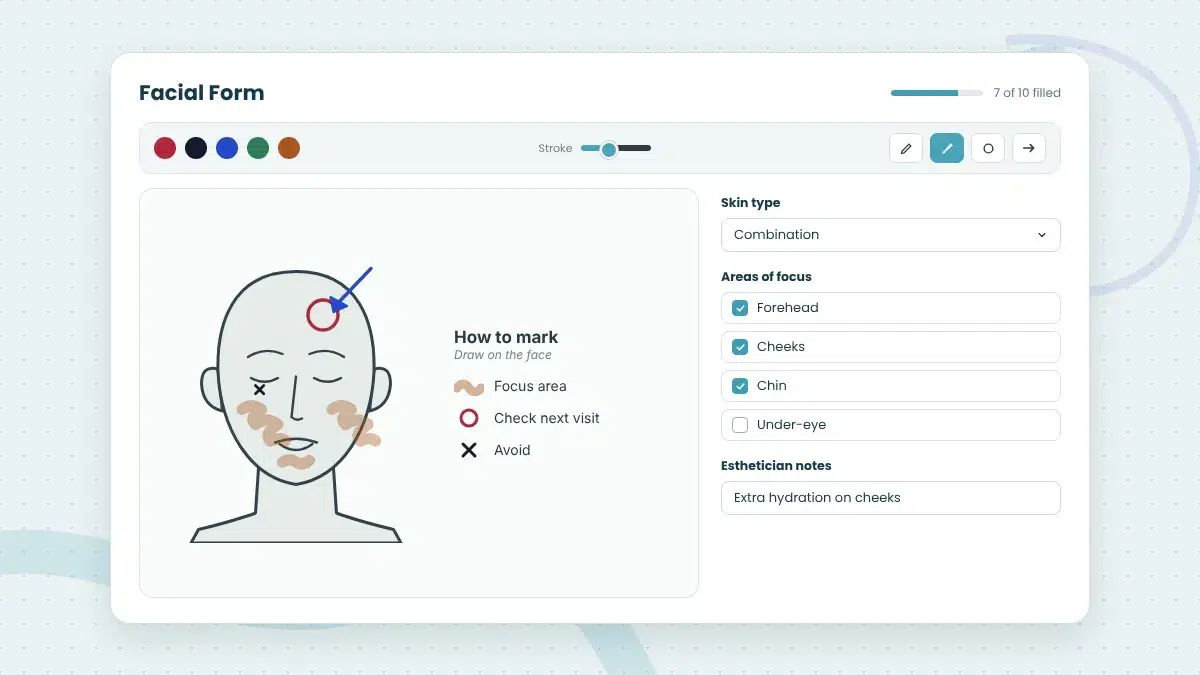
During the appointment, staff can draw directly on the chart using a pen, marker, circle, or arrow, with a choice of colors and line thickness. An esthetician can circle areas of focus on a face map, a laser hair removal provider can outline a treatment area, and a massage therapist can mark areas of tension on a body outline. Undo and clear options make it easy to correct a mark before saving.
What Happens to a Chart After the Appointment?
Once a chart is saved on an appointment, it’s preserved exactly as completed. The background image, field positions, answers, and drawings are kept together with that appointment. If the business later updates the chart, such as moving a field or swapping the image, past appointments keep the version that was actually used. This keeps every appointment’s record accurate over time.
SOAP notes in MyTime also follow a clear review process. Staff can review, save, and mark forms complete, and a completed form becomes read-only. Each custom field keeps its own audit trail showing when it was reviewed, saved, or completed, and completed forms can be printed. Appointment waivers can also be signed and managed from within the same form.
How Do Providers See What Was Done at the Last Visit?
Every completed SOAP note becomes part of the client’s service history. From the appointment, providers can open a read-only history of the client’s past forms, listed by date, time, service, and staff member, and expand any entry to see what was recorded.
Businesses can also choose to carry previously entered values forward to new appointments, so providers start from what’s already known about the client instead of a blank form. For numeric fields, MyTime can show the change between the previous value and the current one. Together, these make it easier for any provider to pick up where the last appointment left off, even if they’ve never seen the client before.
How Do Franchise Brands Standardize Service Notes Across Locations?
For franchise and multi-location brands, consistent documentation is part of delivering a consistent client experience. If every location designs its own forms, the brand loses visibility into what’s being recorded and how.
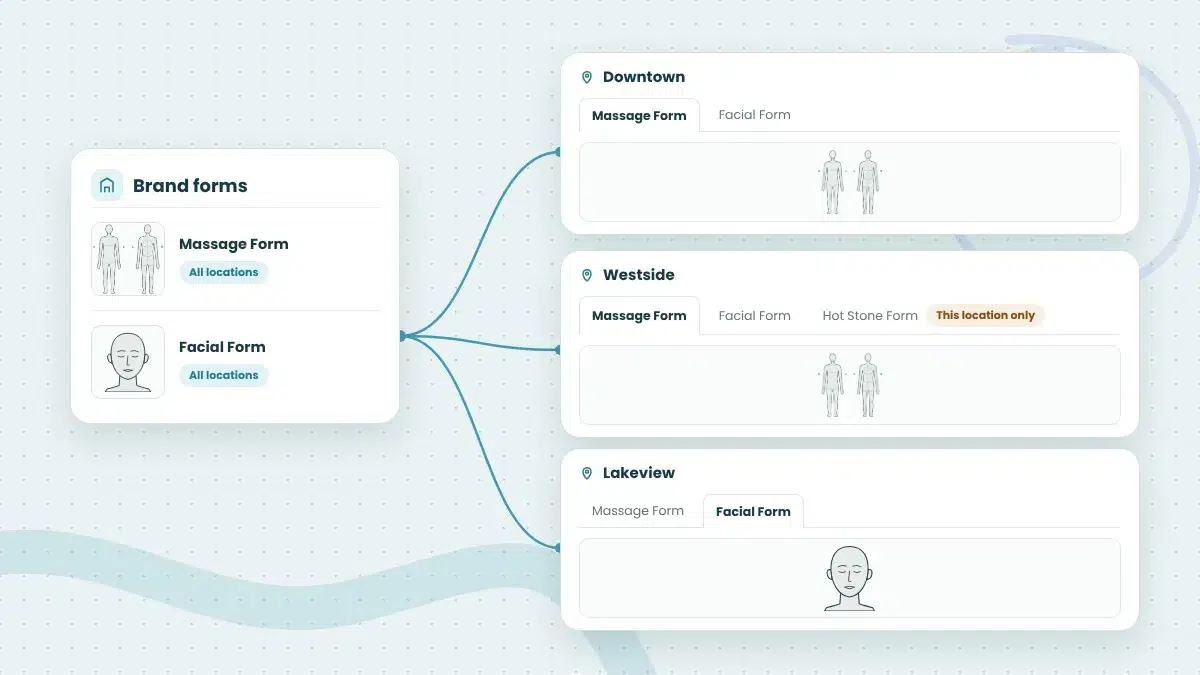
In MyTime, forms and custom fields, including Visual Charting fields, can be created at the parent level and are then available at every location in the network. A brand can build one standard face map or body chart and know that every location is using it. Locations can still create their own charts for local services, and those stay visible only to that location. Franchise brands can also allow staff to view SOAP notes completed at other locations in the network, which helps when a client visits more than one location.
Learn more about client records and intake forms in MyTime.
Is It Time to Retire Paper Charts?
Face maps and body charts are some of the most useful tools a service provider has, and they shouldn’t have to live in a binder. Visual Charting brings them into the appointment record, where they’re easier to fill in, easier to read, and saved exactly as completed. Paired with structured SOAP notes and client history, it gives every provider the context they need to deliver a consistent experience, at every location.
Book a demo to see how MyTime helps service brands document every appointment.
Frequently Asked Questions
What are SOAP notes in MyTime?
SOAP notes in MyTime are staff intake forms that providers complete from the appointment. Businesses choose the fields, the services each form applies to, and the staff roles that can see it. Notes are stored with the appointment and aren’t visible to the client.
Can I upload my own face map or body chart?
Yes. Visual Charting supports PNG and JPEG images, so businesses can upload the face maps, body outlines, or intake sheets they already use. Charts can also start from a blank canvas.
What drawing tools are available in Visual Charting?
Staff can use a pen, marker, circle, or arrow, with a choice of colors and line thickness. Undo and clear options are also available.
What happens to past charts if I change the template?
Nothing. Completed charts are preserved exactly as they were saved, including the image, answers, and drawings. Template changes only apply to future appointments.
Can franchise brands share one chart across all locations?
Yes. Charts created at the parent level are available at every location, while charts created at a single location stay specific to that location.
Can clients see the notes staff record?
No. SOAP notes are stored with the appointment for staff use and aren’t visible to the client.