



Client communication is where franchise and multi-location brands quietly win or lose retention. A fast, personal reply keeps a client engaged; a missed message sends them elsewhere. For decentralized teams working across multiple sites, the hard part isn’t sending messages, it’s staying on top of all of them: knowing which conversations still need a reply, who owns each one, and what the client’s history is before you respond. MyTime Communicator brings all of that into one place, and with the new Communicator Inbox, it’s easier to manage than ever.
This article explains what Communicator does, the problems it solves for busy front desks, how the new Inbox works, and why centralized, franchise-aware client messaging is an advantage for multi-location service brands.
What is MyTime Communicator?
MyTime Communicator is the client messaging tool inside MyTime, the franchise management platform for service brands in beauty, wellness, pet care, fitness, and education. It lets staff connect with clients in real time over SMS, email, and chat from one central place, on desktop or mobile, with every conversation tied to the client’s profile and saved automatically.
Because Communicator is built for franchises, messages route to the correct location and staff even across complex multi-site operations. Clients get communication that feels local and personal, and staff at each location handle their own conversations without threads landing in the wrong place. What used to require juggling phone calls, separate tools, and manual note-taking happens in a single, connected system.
What problems does Communicator solve for franchises?
Most of the daily friction at a front desk comes down to communication that is slow, scattered, or hard to track. Communicator is built to remove that friction directly.
- Too much time on the phone. Handling client questions over SMS, email, or chat instead of live calls reduces front desk workload and eliminates phone tag, while giving clients a faster response.
- Fragmented communication across locations. Franchise-aware routing sends each message to the correct location and staff, so clients experience smooth, location-specific communication even across a large network.
- Disconnected message records. Every conversation is tied to the client profile and saved, so any location can see full history and pick up with complete context.
- Missed appointments and last-minute gaps. Real-time reschedule and cancellation updates keep clients informed and help reduce no-shows.
- Slow, uninformed replies. Client context sits right alongside the conversation, so staff respond quickly without digging through separate records.
Across a franchise network processing bookings and messages at dozens or hundreds of locations, small improvements in responsiveness compound into meaningful gains in retention and repeat visits.
What is the new Communicator Inbox?
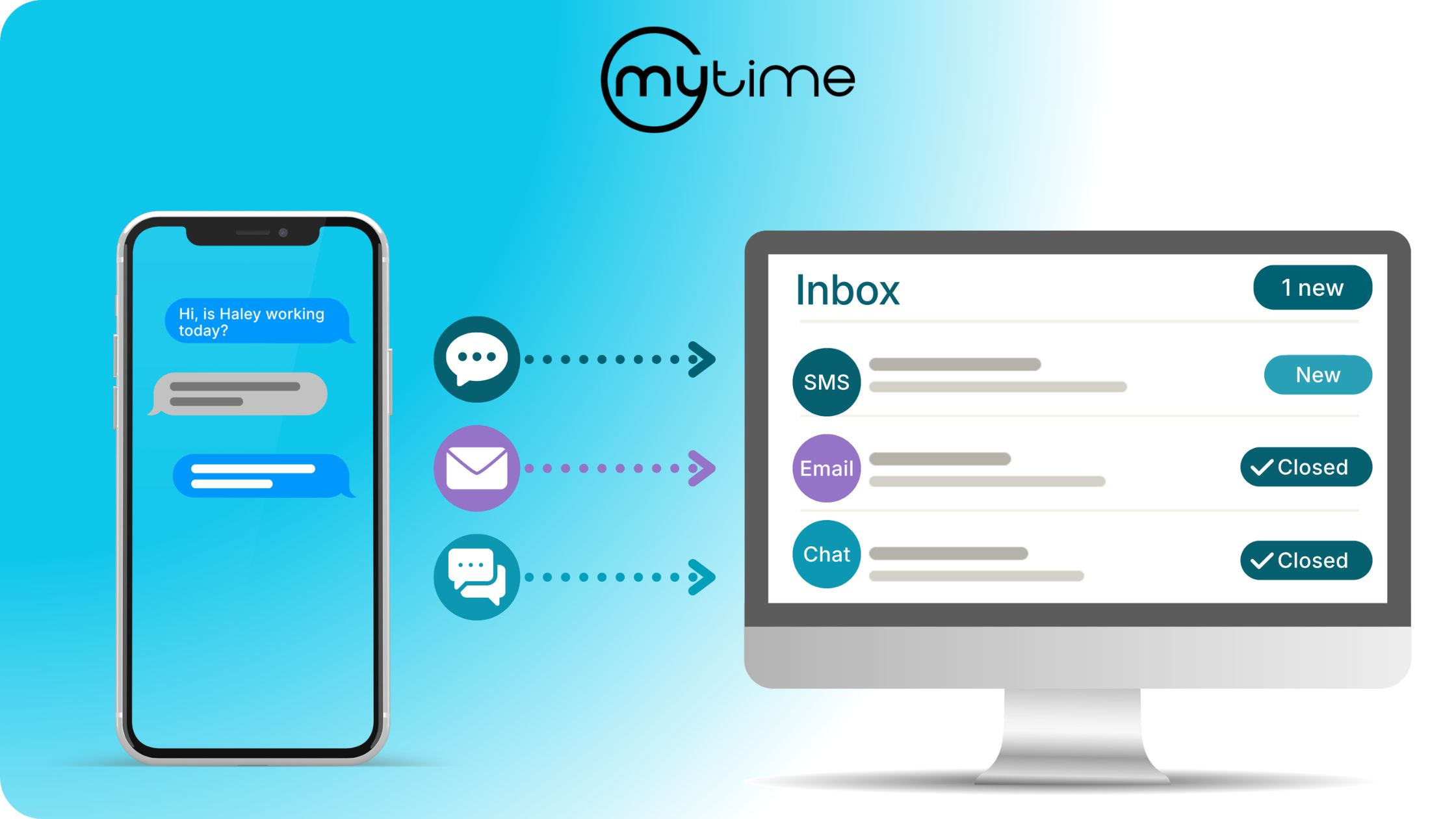
The Communicator Inbox is a single, full-screen view of every client conversation, replacing the pop-up chat windows that appeared one client at a time. It opens over the current page from the same Communicator bar in the bottom-left corner, which now shows a live unread count. When you close the inbox, you land exactly where you were, with any draft message and scroll position preserved.
The left pane lists every conversation, sorted by most recent message, so the most active threads are always at the top. Each row carries a channel badge for SMS, email, or chat, along with clear tags for new, closed, and unassigned conversations. The result is a familiar, easy-to-scan inbox experience built specifically for how service teams work.
How does the Inbox make Communicator easier to use?
The Inbox keeps everything Communicator already does and adds the structure that busy, decentralized teams need to stay organized. Four capabilities do most of the work.
Conversation status. Every conversation is either open or closed, so the team can see at a glance what still needs a reply. Staff can respond with Send, or with Send & Close to reply and mark the conversation handled in a single step. If a client sends a new message on a closed conversation, it reopens automatically, so nothing that needs attention stays out of view.
Staff assignment. Any conversation can be assigned to a specific staff member or left unassigned, which makes ownership clear and keeps follow-up from falling through the cracks. Teams can filter the inbox by assigned staff member to focus on what’s theirs.
Client context in the thread. The right rail surfaces the detail that used to require opening a separate tab: contact information, next and last appointment with service, date, time and staff, preferred location and staff, children or pets, active memberships, active packages, and client notes. A link opens the full client profile when it’s needed. Staff reply with the full relationship in front of them rather than starting from scratch.
Location-aware filtering and search. Conversations can be filtered by location, status, staff, and channel. Search and the staff dropdowns respect the selected location, so a team working one site isn’t wading through conversations from another.
How does the Inbox help multi-location and franchise teams specifically?
Franchise operations run on clarity across sites, and the Inbox is designed around that reality. Location filtering keeps each site’s conversations distinct, so staff see what’s relevant to where they work. Assignment gives every conversation an owner, which matters most when teams are decentralized and no single person is watching the whole queue. Status makes follow-up visible across the team, so a handoff between shifts or staff doesn’t mean a dropped thread.
Because conversations are tied to the global client profile, history and context travel with the client no matter which location they interact with. A client who visited one site and messages another is met by staff who can see their full record. That continuity is difficult to deliver manually at scale, and it’s exactly what keeps clients feeling recognized as a brand grows.
Does turning on the Inbox change how my team works today?
Companies get the new Inbox only when the Communicator Inbox setting is enabled for them. Until then, Communicator continues to work exactly as it does today. Access permissions carry over as well: staff with view-only Communicator access can see conversations and history, while compose, assignment, and close controls stay hidden with a read-only notice shown instead. The Inbox is an upgrade to an established tool, not a workflow your team has to relearn.
For a full walkthrough of the inbox and how to enable it, see our Help Center guide.
Client communication built to scale with your brand
The brands that retain clients are the ones that respond quickly, consistently, and with context, at every location. Communicator gives franchise operators a single place to do that in real time, and the new Inbox adds the visibility, ownership, and organization that make responsiveness sustainable as a network grows. Automated messaging opens the conversation; Communicator is where your team carries it through.
Frequently Asked Questions
What is MyTime Communicator?
Communicator is MyTime’s client messaging tool. It lets franchise and multi-location businesses message clients in real time over SMS, email, and chat from one central place, with every conversation tied to the client’s profile and saved automatically.
What is the Communicator Inbox?
The Communicator Inbox is a single, full-screen view of every client conversation, replacing the individual pop-up chat windows. It adds conversation status, staff assignment, client context, and location-aware filtering to make managing messages easier.
How does the Inbox help teams keep track of client messages?
Every conversation has an open or closed status, so teams can see what still needs a reply. Staff can assign conversations to specific people, and a closed conversation reopens automatically when a client sends a new message.
Does Communicator route messages to the right location?
Yes. Communicator uses franchise-aware routing to send each message to the correct location and staff, so clients receive location-specific communication even across large multi-site operations.
Can staff see client details while messaging?
Yes. The Inbox shows client context alongside the conversation, including next and last appointment, preferred location and staff, memberships, packages, and notes, so staff can respond with full context without leaving the inbox.
Do I have to enable the Communicator Inbox?
The Inbox appears only when the Communicator Inbox setting is enabled for your company. Until then, Communicator works exactly as it does today, and access permissions carry over unchanged.
Ready to keep every client conversation in one place across your locations? Book a demo to see how MyTime Communicator works. If you are already a MyTime customer and would like to learn more, reach out to support or your account manager.